Version Control
You should use version control
Please Log In for full access to the web site.
Note that this link will take you to an external site (https://shimmer.mit.edu) to authenticate, and then you will be redirected back to this page.
So we're requiring all teams to use some form of version control for final projects this year in 2025. More specifically, you must use the git repositories we set up for you and found under your MIT github enterprise account. You should have a team-specific repository in the 6205F25 organization.
Git Reference Guides
For those of you unfamiliar with git, a good summary from the 6.102 site is found here. Read through it since they do a good job covering all general bases. Actually read through it.
Some other more general instructions on the github repository setup are found at the following links:
- Quickstart for repositories: For the most part this has already been done for you, but you're welcome to look through it.
Cloning Your Repo
You should be working in the MIT github repository we've made for you; in order to clone that repository, you should run a clone command: if you have SSH keys set up for authentication, it'll look like this:
git clone git@github.mit.edu:6205F25/fa25-6205-teamXX
or if you want to authenticate without an SSH key (and instead use a personal access token as your password), it'll look something like this:
git clone https://github.mit.edu/6205F25/fa25-6205-teamXX
If you get a message from this saying you don't have repository access or it doesn't exist, that means you haven't set up a way to authenticate your MIT GitHub account. You can do that either by following This SSH Key Guide or This Personal Access Token Guide.
Commit (and Push) Often
Since you're working on this project collaboratively and we're also using the repository for grading it is important for you to be commmiting and pushing the work you do often. If you just do one giant commit/push at the end of the project, that will lose a lot of points. We need to see a track record of you (your whole team) doing consistent work throughout the duration of the final project.
When you sit down to work on your project, you should always follow a few steps
git pull, to get any changes your teammates have made while you were gone- Change code, build things
- Commit your changes with a useful comment about what you added
git push, so your teammates can see what you did
Git Ignore
In the root of your repository, it is often useful to place a .gitignore file to prevent doing version control on things that shouldn't be version controlled. In our class, every time you run lab-bc a zipped archive of your submitted material and the response is stored in the _history folder. This likely should not be version-controlled, so we strongly suggest making a .gitignore file with *.zip in it at the very least.
There are plenty of other files that you don't want to include in your version control, because they're files that get generated after each build. Generally, you do want files that you design (.sv SystemVerilog designs, .py testbenches, .mem memory initialization files, etc) to get committed, and you don't want files that get auto-generated (the whole obj/ directory, .fst waveform files, contents of the sim_build/ directory) to get committed. These are other things that might belong in your .gitignore file.
README
Each directory of your repository should have a README.md file in place with notes on what is going on in that particular portion. Think of this as a "comment file" describing what is inside that subdirectory. This can be really helpful in understanding different sub-projects that you're building up.
Version Control in this class: A Strategy
I have some general thoughts on version control for this class. Your final project repository does not need to be thought of as only containing your source code for a single final project. I would instead strongly suggest you subdivide the repository into different sub-projects that exist in parallel, especially if you're uncomfortable with branches, and especially early on when the project is likely comprised of disparate mini-projects being developed which are extremely different (and possibly with completely different endpoints), it may be cleaner and easier to manage things overall. For example, I could imagine a sub/mini-project that has the sole purpose of collecting microphone data with the intent of using it in simulations that eventually go into creating modules for the more general project. I would strongly recommend keeping something like that as a completely separate sub-directory in your repository and leaving it as is even when things are finished. This also has the added benefit of keeping areas of work relatively isolated from one another.
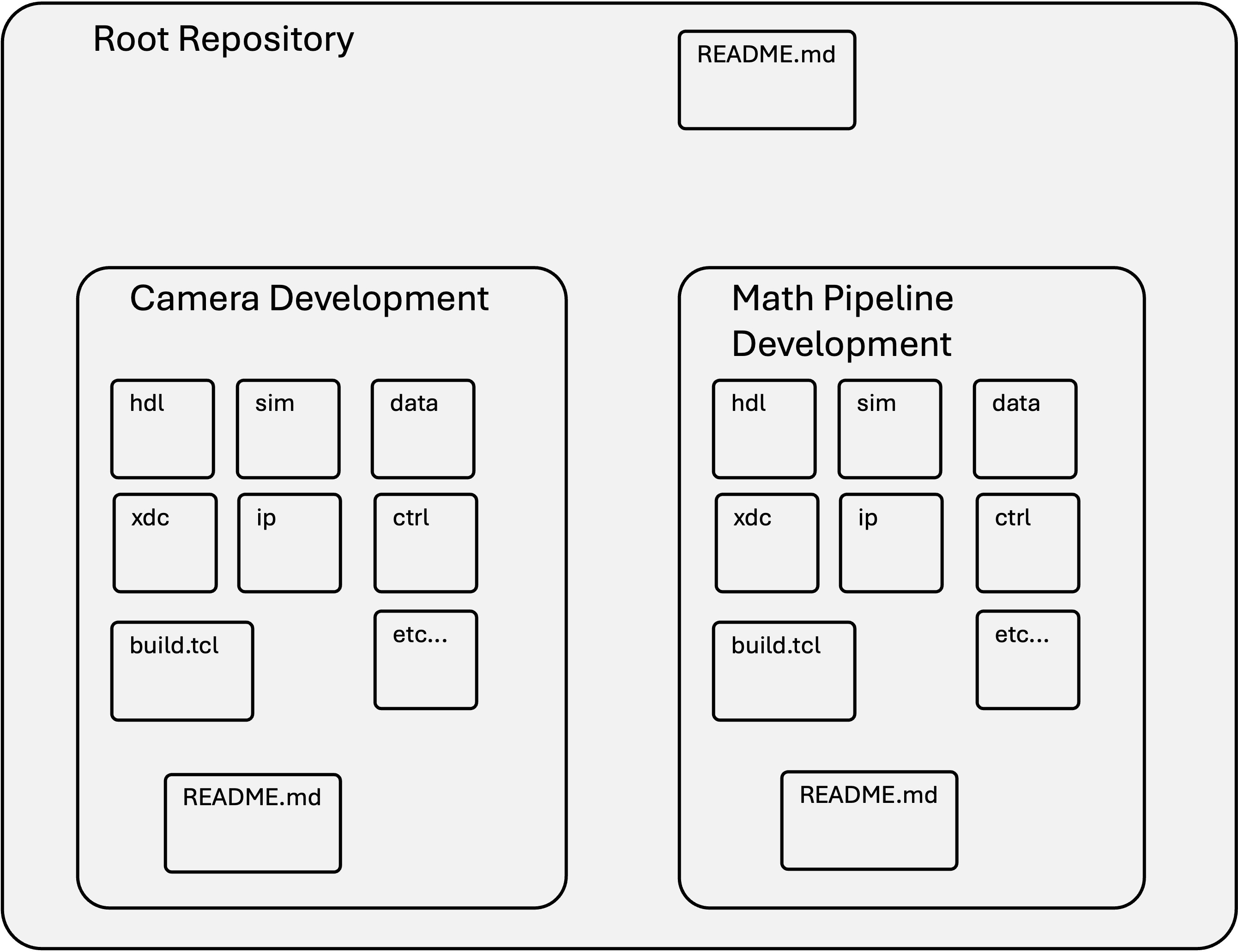
Later on when it is time to start merging all content into the actual full project, perhaps creating a new third (or N+1th sub-directory) could then be done to make the actual final "project". At that point, branches and things might make sense.
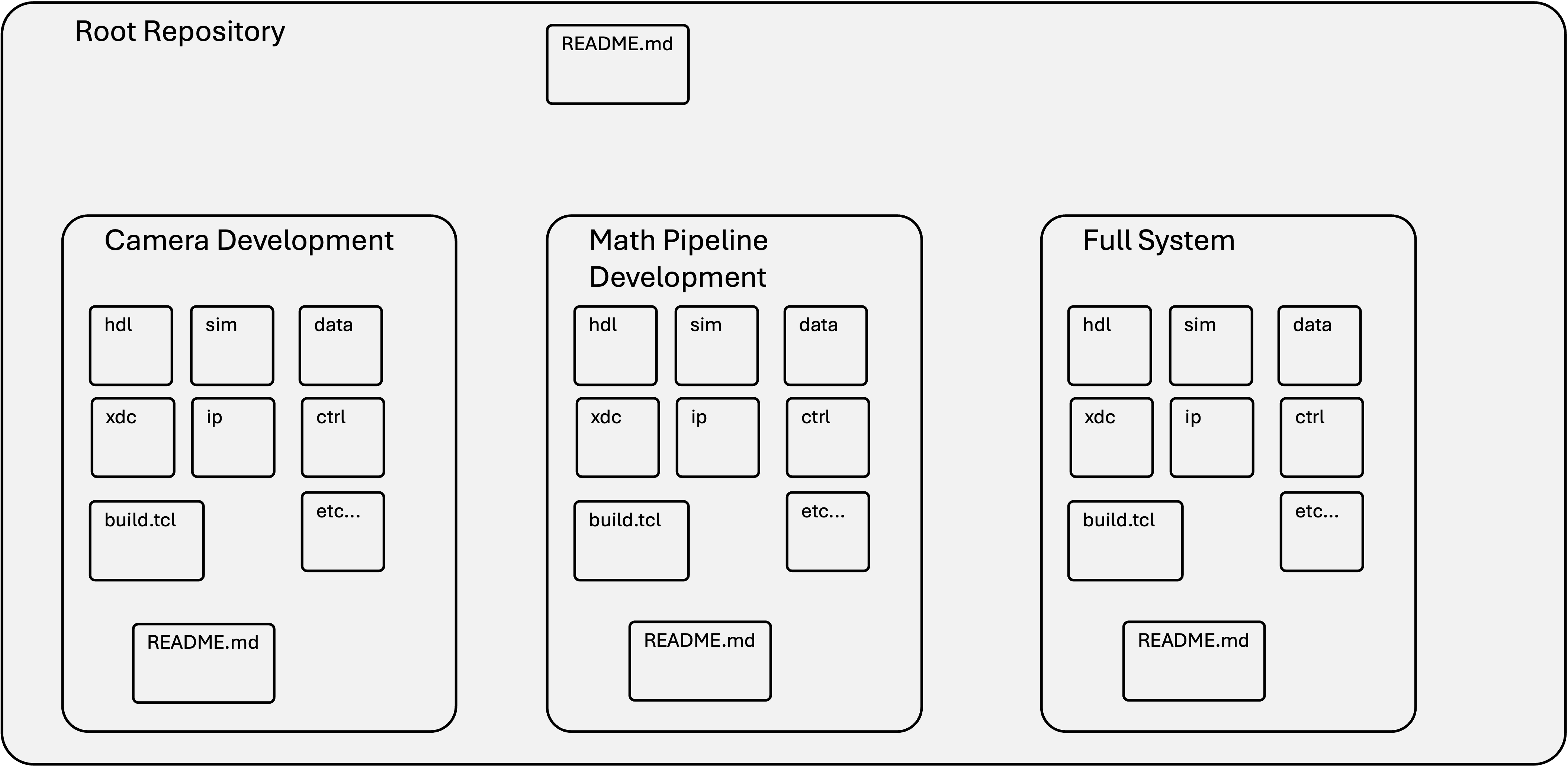
Again, how you choose to do and use version control is up to you and should be part of being a good engineer (hardware or software it doesn't matter).